


安装与创建
安装 X-Code
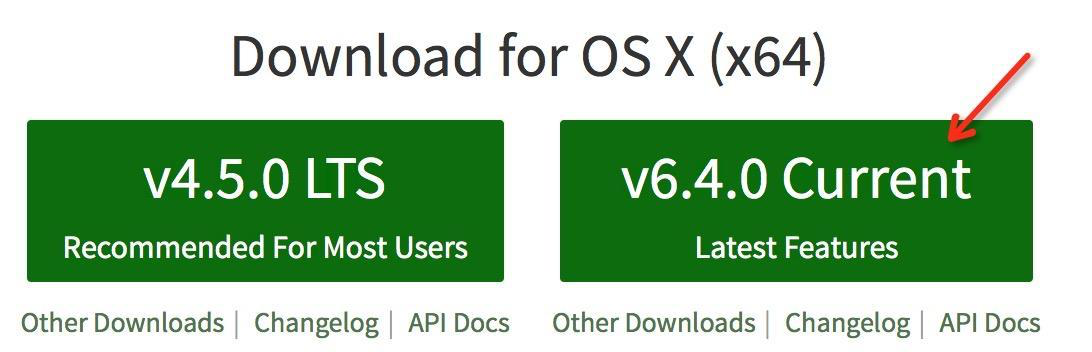
安装 Node.js 环境
官网下载:Node.js
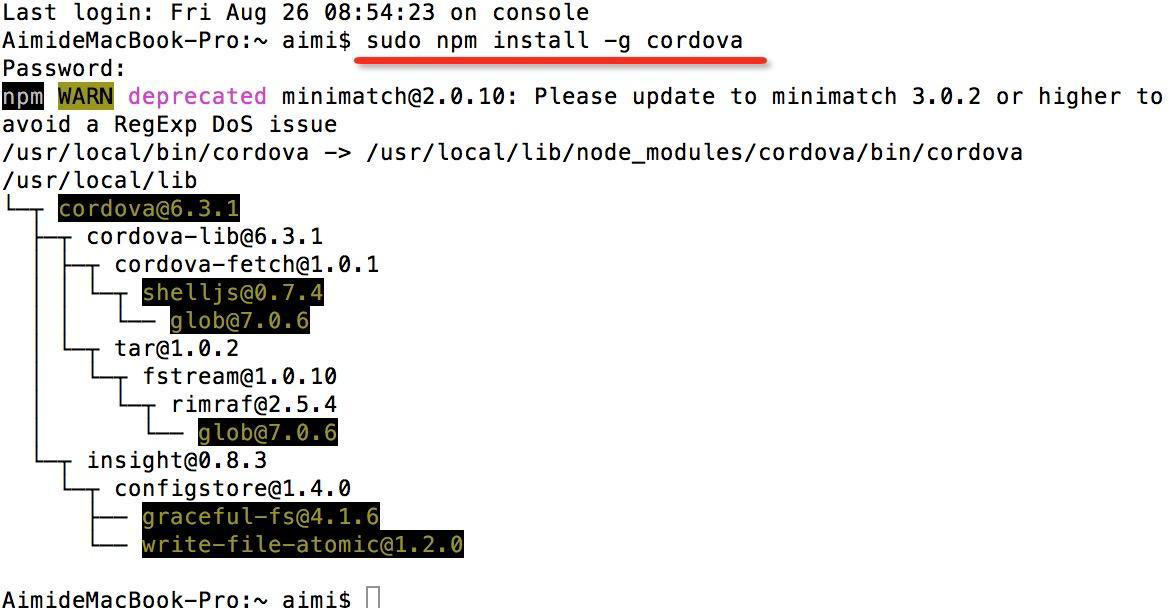
安装 Cordova
sudo npm install -g cordova
若失败,参考解决方案
- 安装 GIT Client
- 从 Cordova 命令行帮助 中查找出问题的命令
创建项目
- 新建文件夹并选中

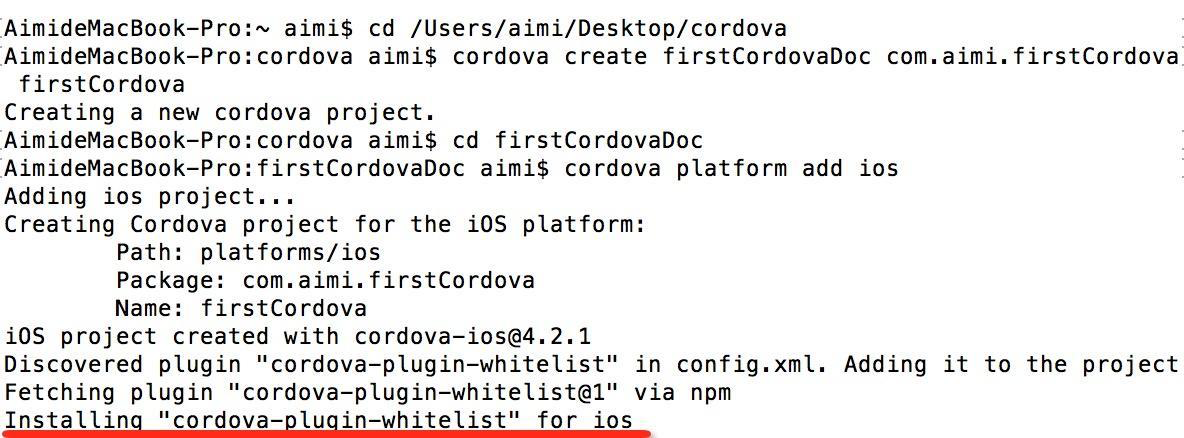
- 创建项目
cordova create firstCordovaDoc com.aimi.firstCordova firstCordova
- 创建 iOS 工程
cordova platform add ios
找到 platforms 文件夹中的 ios 文件夹
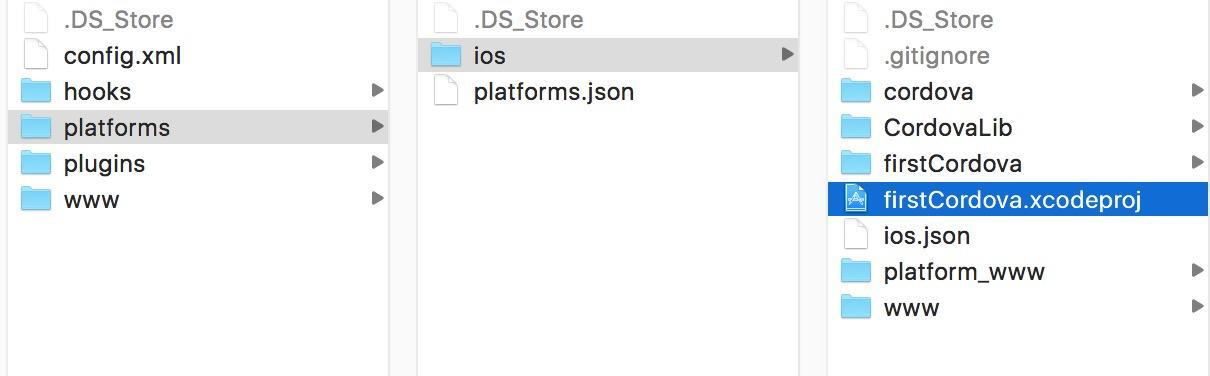
4. 创建完成
入口:Staging 文件夹下的 Index.html
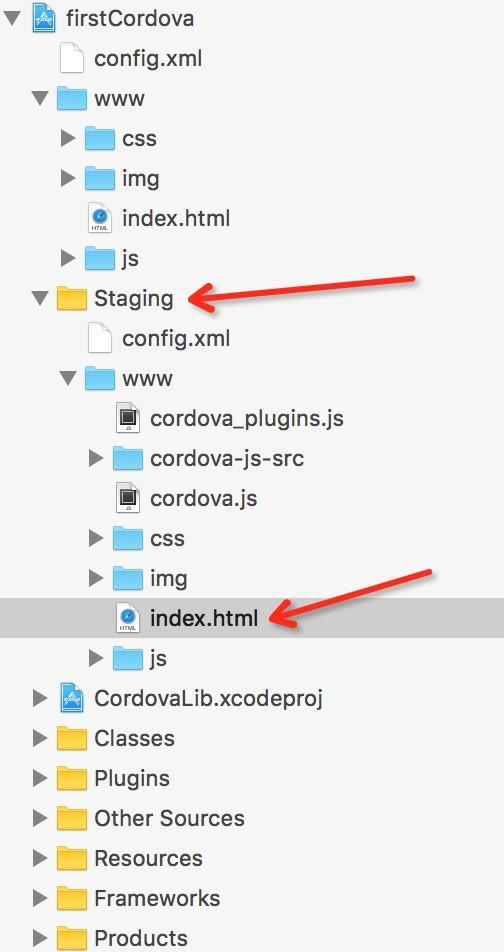
简单测试一下,可以修改 Index.html 的代码查看效果
<html lang="zh-CN">
    <head>
        <meta http-equiv="Content-Type" content="text/html; charset=UTF-8">
            <title>页面标题</title>
    </head>

    <body>
         <h1 align="center">
            YO!Man!
        </h1>
    </body>
</html>
插件开发
创建插件源文件
- 找到 Plugins 文件夹
- 创建 com.anCordova.anAlert 文件夹
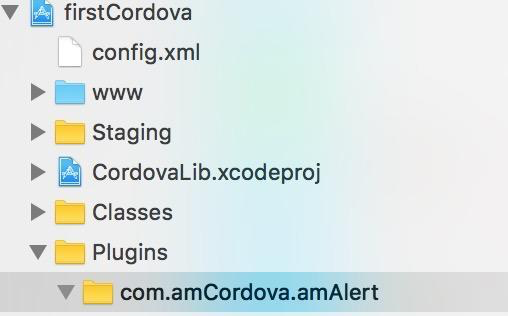
- 新建代码文件,继承 CDVPlugin
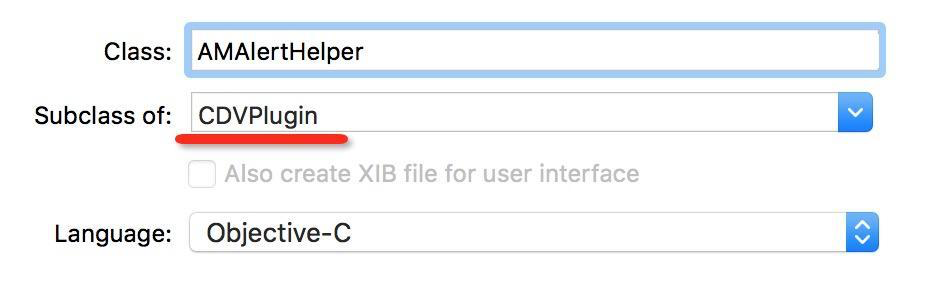
- 修改文件头,避免报错
#import <Cordova/CDVPlugin.h>
@interface AMAlertHelper : CDVPlugin
@end
编写插件方法
- (void)showAlertWithTitle:(CDVInvokedUrlCommand *)command{
    if (command.arguments.count>0) {
        //获取到入参数组中的第一个元素
        //自由约定入参数组的顺序
        NSString* title = command.arguments[0];
        //创建alertVC
        UIAlertController* alertVC = [UIAlertController alertControllerWithTitle:title message:nil preferredStyle:UIAlertControllerStyleAlert];
        UIAlertAction* action = [UIAlertAction actionWithTitle:@"确定" style:UIAlertActionStyleDefault handler:^(UIAlertAction * _Nonnull action) {
            //创建一个回调对象并附上String类型参数
            CDVPluginResult* pluginResult = [CDVPluginResult resultWithStatus:CDVCommandStatus_OK messageAsString:@"Hey!I'm OC!"];
            //通过cordova框架中的callBackID回调至JS的回调函数上
            [self.commandDelegate sendPluginResult:pluginResult callbackId:command.callbackId];
        }];
        [alertVC addAction:action];
        [self.viewController presentViewController:alertVC animated:YES completion:nil];
    }else{
        //如果没有入参,则回调JS失败函数
        CDVPluginResult* pluginResult = [CDVPluginResult resultWithStatus:CDVCommandStatus_ERROR messageAsString:@"没有入参alert title"];
        [self.commandDelegate sendPluginResult:pluginResult callbackId:command.callbackId];
    }
}
配置 config.xml
<feature name="ocAlertModel">
	<param name="ios-package" value="AMAlertHelper" />
</feature>
插件运作原理
在源生 UIWebView 中注入模型
self.jsContext = [webView valueForKeyPath:@"documentView.webView.mainFrame.javaScriptContext"];
AMAlertHelper * ocAlertmodel  = [[AMAlertHelper alloc] init];
self.jsContext[@"AMAlertModel"] = ocAlertmodel;
ocAlertmodel.jsContext = self.jsContext;
ocAlertmodel.webView = self.webView;
调用并调试
在 Staging 的 Index.html 替换如下代码
<html>
	<head>
		<title>AMAlert</title>
		<meta http-equiv="Content-type" content="text/html; charset=utf-8">
		<script type="text/javascript" charset="utf-8" src="cordova.js"></script>
		<script type="text/javascript" charset="utf-8">
			//调用OC插件方法
			function alertShow() {
				//以字符串形式调用OC注入模型的实例方法
				//通过cordova 将我们的模型名称,方法名,参数,成功回调的func及失败回调的func 传入
				cordova.exec(alertSuccess,alertFail,"ocAlertModel","showAlertWithTitle",["Hey,I'm JS!"]);
			}
			//调用成功的回调函数
			function alertSuccess(msg) {
				alert(msg);
			}
			//调用失败的回调函数
			function alertFail(msg) {
				alert('调用OC失败: ' + msg);
			}
		</script>
	</head>
	<body style="padding-top:50px">
		<button style="font-size:17px;" onclick="alertShow();">调用OC插件</button> <br>
	</body>
</html>
最终效果
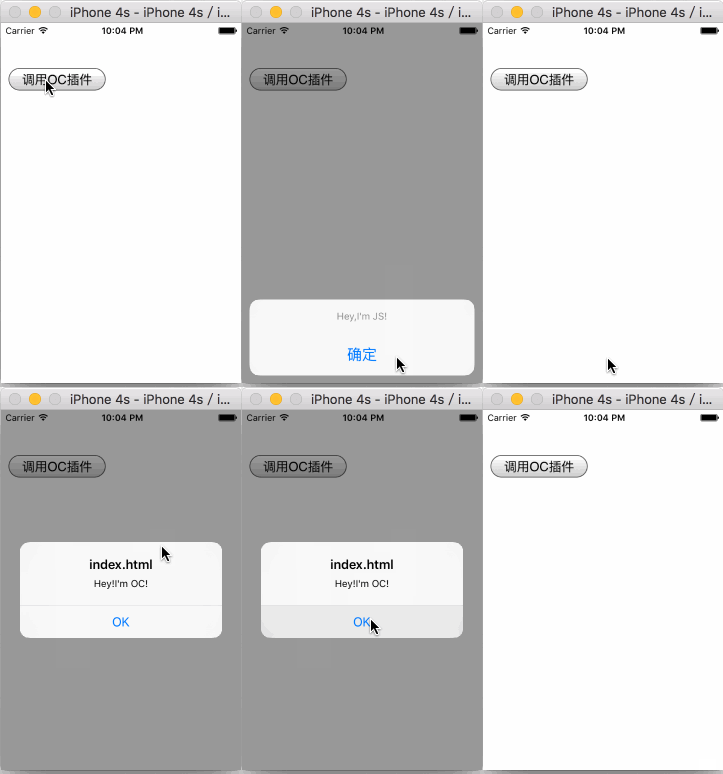
打包插件
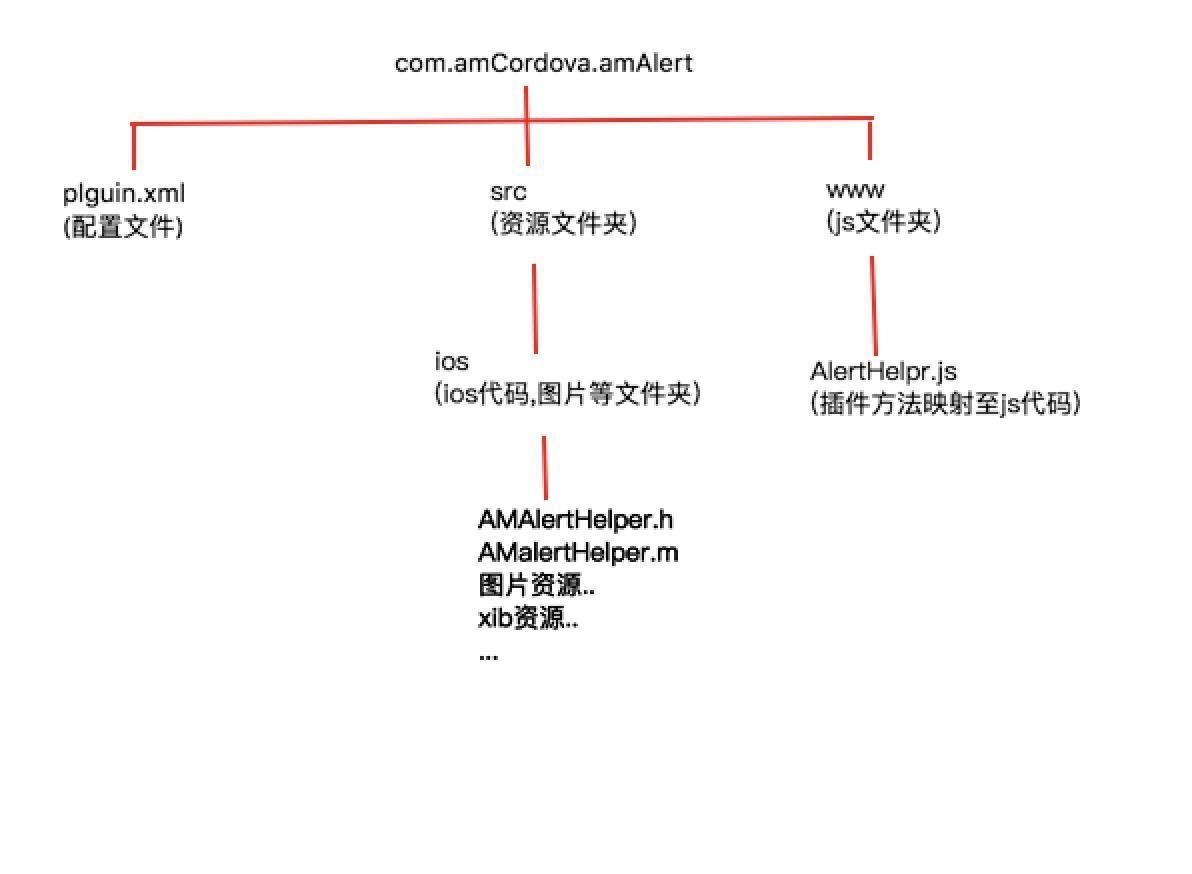
创建打包用文件夹
创建 cordova-amAler-plugin-ios 文件夹
编写 JS 代码
AlertHelper.js
var exec = require("cordova/exec");
//定义一个类名为AlertHelper的对象构建函数
function AlertModel() {};
//给AlertModel添加一个js方法jsAlertShow
//映射至之前写的方法上 ocAlertModel是我们给OC类命名的实例对象名称
//showAlertWithTitle是我们OC的方法
//option是入参
AlertModel.prototype.jsAlertShow = function (success,fail,option) {
	exec(success, fail, 'ocAlertModel', 'showAlertWithTitle', option);
};
//new一个AlertModel的类对象,并赋值给module.exports
var alertModel = new AlertModel();
module.exports = alertModel;
配置 plugin.xml
<?xml version="1.0" encoding="UTF-8" ?>
<!--    id需要和文件夹名称保持一致 (插件的id)-->
<plugin xmlns="http://phonegap.com/ns/plugins/1.0"
		id="com.amCordova.amAlertHelper"
		version="1.0.0">
	<engines>
		<engine name="cordova" version=">=3.3.0" />
	</engines>
	<name>alertHelper</name>
	<description>插件的描述</description>
	<!--    对应js映射文件的地址及名称-->
	<js-module src="www/AlertHelper.js" name="alertModel">
		<!--    js调用时的对象名称-->
		<clobbers target="alertModel" />
	</js-module>
	<!--    ios所有文件的存放地址-->
	<!--如果有图片的话也需要在这里配置,前缀是source-file-->
	<platform name="ios">
		<source-file src="src/ios/AMAlertHelper.m" />
		<header-file src="src/ios/AMAlertHelper.h" />
		<config-file target="config.xml" parent="/widget">
			<!--            插件映射至ios的类名-->
			<feature name="ocAlertModel">
				<param name="ios-package" value="AMAlertHelper" />
			</feature>
		</config-file>
	</platform>
</plugin>
测试插件
- 新建 Cordova 项目并添加 iOS 工程
- 进入项目目录
cd /Users/aimi/Desktop/cordova/testCordovaDoc
- 添加本地插件包
cordova plugin add /Users/aimi/Desktop/cordova/MyPlugin/com.amCordova.amAlert
- 调用插件
alertModel.jsAlertShow(alertSuccess,alertFail,["Hey,I'm JS!"]);
- 替换 index.html
<html>
	<head>
		<title>AMAlert</title>
		<meta http-equiv="Content-type" content="text/html; charset=utf-8">
		<script type="text/javascript" charset="utf-8" src="cordova.js"></script>
		<script type="text/javascript" charset="utf-8">
			//调用OC插件方法
			function alertShow() {
				//通过js代码调用
				alertModel.jsAlertShow(alertSuccess,alertFail,["Hey,I'm JS!"]);
			}
			//调用成功的回调函数
			function alertSuccess(msg) {
				alert(msg);
			}
			//调用失败的回调函数
			function alertFail(msg) {
				alert('调用OC失败: ' + msg);
			}
		</script>
	</head>
	<body style="padding-top:50px">
		<button style="font-size:17px;" onclick="alertShow();">调用OC插件</button> <br>
	</body>
</html>
Cordova 开发 iOS 说明书
https://xn--wgv44dw7s.cn/2016/06/20/lmQth46c
评论