


更换了正式版的 SDK,因为需求是第三方登录应用,所以要添加外部程序的启动功能
想要你的 APP 启动另外的 APP,就需要在下图中添加相关APP的信息
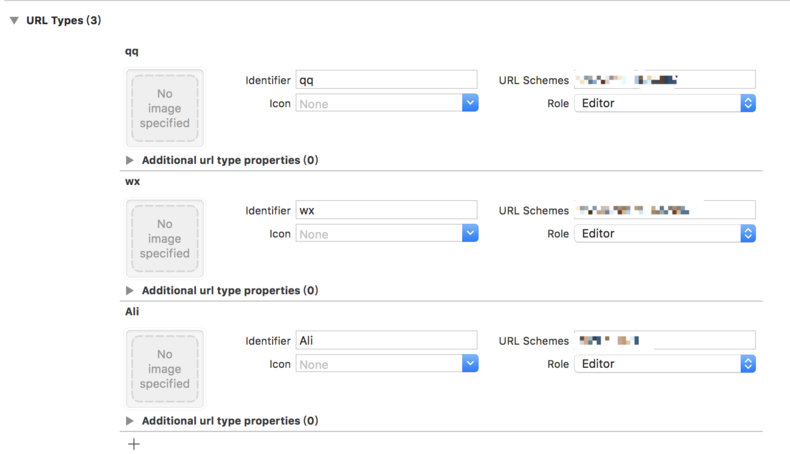
但是想要集成到自动编译打包中,肯定不能手动的在图形界面中添加了
上图的本质呢,其实还是 Info.plist 文件,只是 Xcode 帮你把 plist 可视化了而已,所以我们的具体操作还是通过 Unity 脚本去修改 plist 文件就可以了
string plistPath = Path.Combine(pathToBuildProject, "Info.plist");
PlistDocument plist = new PlistDocument();
plist.ReadFromFile(plistPath);
PlistElementDict rootDict = plist.root;
//CFBundleURLTypes
const string urlKey = "CFBundleURLTypes";
PlistElementArray urlAry;
PlistElement urlel;
if (rootDict.values.TryGetValue(urlKey, out urlel))
{
	urlAry = lspel.AsArray();
}
else
{
	urlAry = rootDict.CreateArray(urlKey);
}
PlistElementDict qqdic = urlAry.AddDict();
qqdic.SetString("CFBundleTypeRole", "Editor");
qqdic.SetString("CFBundleURLName", "qq");
PlistElementArray qqary = new PlistElementArray();
qqary.AddString("*************");
qqdic["CFBundleURLSchemes"] = qqary;
PlistElementDict wxdic = urlAry.AddDict();
wxdic.SetString("CFBundleTypeRole", "Editor");
wxdic.SetString("CFBundleURLName", "wx");
PlistElementArray wxary = new PlistElementArray();
wxary.AddString("*************");
wxdic["CFBundleURLSchemes"] = wxary;
PlistElementDict alidic = urlAry.AddDict();
alidic.SetString("CFBundleTypeRole", "Editor");
alidic.SetString("CFBundleURLName", "Ali");
PlistElementArray aliary = new PlistElementArray();
aliary.AddString("*************");
alidic["CFBundleURLSchemes"] = aliary;
// 应用修改
File.WriteAllText(plistPath, plist.WriteToString());
上面的代码只是简单的例子,但是完全可以满足少量外部 APP 开起的需求,如果你需要添加更多的外部 APP,请使用 for 循环添加(笑)
PostProcessBuild-的使用方法(续)
https://xn--wgv44dw7s.cn/2018/08/04/rQRmUSZK
评论